Campaign Analytics
Measure the performance of your messaging campaigns at a glance. Track delivery, engagement, and opt-out metrics to understand how your messages are landing with your audience.
Written By Jill Berkowitz
Last updated 11 months ago
Contact sales@clerk.chat to enable the campaign analytics feature.
Accessing Campaign Analytics
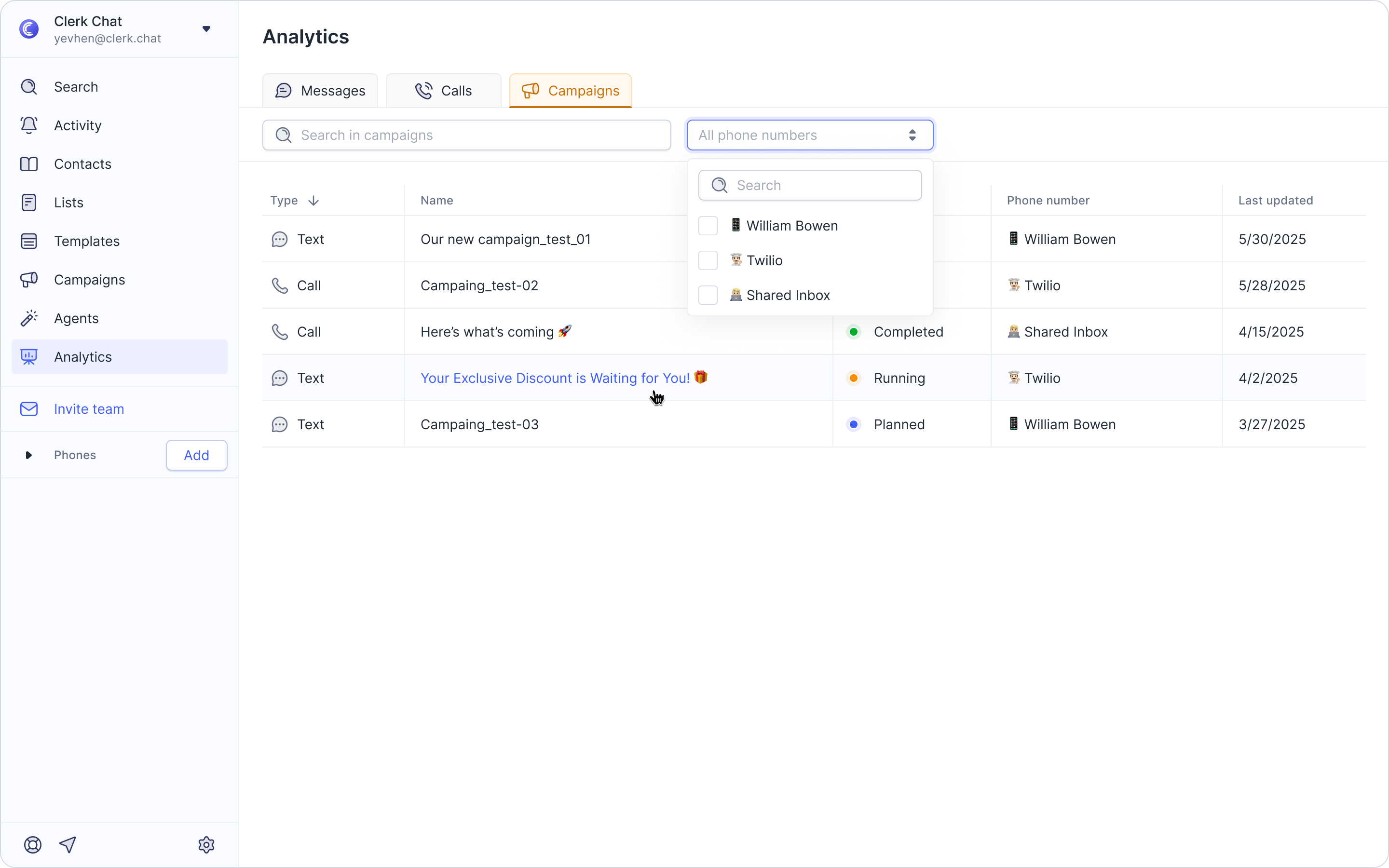
Go to Analytics from the sidebar.
Click the Campaigns tab.
Use the search bar to find a specific campaign or select a phone number to view all campaigns associated with it.
Alternatively, scroll through the campaign list and select the one you’d like to review.
Available Data
Total Messages Delivered: See how many messages were successfully delivered to your audience.
Total Read: Track how many recipients opened or viewed your message.
Total Opt-Outs: Monitor the number of contacts who chose to unsubscribe after receiving your campaign, helping you maintain healthy engagement and compliance.
Additional Insights for RCS Campaigns: See engagement actions, giving you deeper visibility into how recipients are responding to your content.
Pro Tip
Campaign Analytics are a great way to measure message effectiveness, test new strategies, and refine future campaigns based on what resonates most with your audience.
Watch a video tutorial
Was this helpful?
Still need help? Share an idea